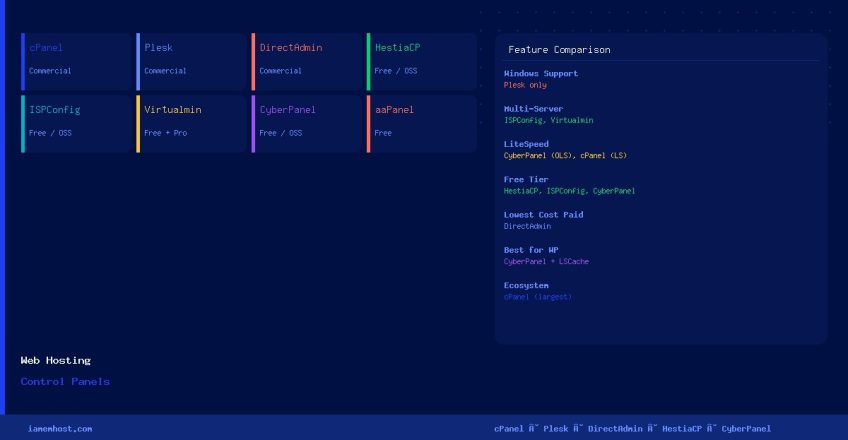

A web hosting control panel is a browser-based management interface that lets users configure web servers, databases, email accounts, DNS zones, FTP, and SSL certificates — without needing to run command-line tools or edit configuration files by hand. For hosting providers, choosing the right control panel directly impacts customer satisfaction, support overhead, and server performance.
What Does a Hosting Control Panel Do?
- Creates and manages web hosting accounts and virtual hosts (Apache / Nginx / LiteSpeed)
- Provisions email accounts, aliases, forwarders, and spam filters
- Manages DNS zones and nameserver records
- Creates and restores MySQL / MariaDB / PostgreSQL databases
- Issues and renews SSL/TLS certificates (Let’s Encrypt integration)
- Handles FTP / SFTP account management
- Provides file managers, PHP version selectors, and one-click app installers (WordPress, Joomla, etc.)
- Generates account backups and restores them on demand
Commercial (Paid) Control Panels
1. cPanel / WHM
The industry standard for Linux shared hosting. WHM (Web Host Manager) is the reseller / root-level interface; cPanel is the per-account end-user interface. Supports Apache with mod_php, PHP-FPM, LiteSpeed (via EasyApache), Exim mail, Dovecot IMAP/POP3, and tight integration with Cloudflare, Imunify360, and JetBackup. Licensing is now per-account based (no flat server fee).
Best for: Shared hosting providers, reseller hosting.
OS: AlmaLinux, CloudLinux, Rocky Linux, CentOS Stream.
cpanel.net
2. Plesk
The only major commercial panel that supports both Linux and Windows. Plesk ships with built-in Nginx support (as a standalone server or reverse proxy in front of Apache), Docker integration, Git deployment, and a native WordPress Toolkit add-on. Its extension marketplace covers most cPanel feature gaps.
Best for: Agencies managing mixed Linux/Windows estates, developers wanting Git-based deployments.
OS: AlmaLinux, Ubuntu, Debian, Windows Server.
plesk.com
3. DirectAdmin
A lightweight, high-performance alternative to cPanel with a significantly lower license cost. DirectAdmin runs comfortably on servers as small as 512 MB RAM and handles thousands of accounts on a single server. Supports Apache, Nginx, OpenLiteSpeed, and CustomBuild for compiling PHP versions.
Best for: Budget hosting providers and high-density shared hosting.
OS: AlmaLinux, CloudLinux, Ubuntu, Debian.
directadmin.com
Free and Open-Source Control Panels
1. HestiaCP
The actively maintained successor to the discontinued VestaCP. HestiaCP provides a clean, modern interface with support for Apache + Nginx (standalone or reverse proxy), Exim, Dovecot, MariaDB, and Let’s Encrypt. It is well-suited for VPS providers who need a free yet polished panel.
Best for: VPS hosting, small providers, self-managed servers.
OS: Ubuntu, Debian.
hestiacp.com
2. ISPConfig
A mature, multi-server open-source panel that can manage clusters of web, mail, and DNS servers from a single interface. ISPConfig supports Apache, Nginx, Postfix, Dovecot, PureFTPD, and BIND/PowerDNS. It has a proper reseller system and role-based access control.
Best for: Multi-server environments, ISPs needing a free reseller panel.
OS: Debian, Ubuntu, AlmaLinux, Rocky Linux.
ispconfig.org
3. Webmin / Virtualmin
Webmin is a general-purpose server administration panel covering hundreds of Linux subsystems. Virtualmin is a hosting-specific module on top of Webmin that adds virtual host management, email provisioning, and a reseller system. Virtualmin GPL is free; Virtualmin Pro adds advanced backup and migration features.
Best for: System administrators who want granular Linux control alongside hosting management.
OS: Most major Linux distributions.
virtualmin.com
4. CyberPanel
Built specifically around OpenLiteSpeed (the open-source edition of LiteSpeed Web Server), CyberPanel delivers exceptional PHP and WordPress performance out of the box. It includes built-in LSCache integration, Rainloop webmail, MariaDB, PowerDNS, and Let’s Encrypt. The free tier covers unlimited domains.
Best for: WordPress-heavy hosting, performance-optimised VPS setups.
OS: AlmaLinux, Ubuntu, CentOS Stream.
cyberpanel.net
5. aaPanel
Originally from China (BaoTa Panel), aaPanel is the international edition. It offers a clean dashboard for managing Apache or Nginx, MySQL/MariaDB, PHP, FTP, and SSL. Particularly popular for single-site VPS setups and developers who want a graphical interface without the complexity of a full reseller panel.
Best for: Developers, single-tenant VPS, small agencies.
OS: CentOS, Ubuntu, Debian.
aapanel.com
Control Panel Comparison
| Panel | License | OS Support | Web Server | Best Use Case |
|---|---|---|---|---|
| cPanel/WHM | Paid (per account) | AlmaLinux, CloudLinux | Apache, LiteSpeed | Shared hosting providers |
| Plesk | Paid (per server) | Linux + Windows | Apache, Nginx | Mixed OS, dev-focused hosting |
| DirectAdmin | Paid (low cost) | AlmaLinux, Ubuntu | Apache, Nginx, OLS | Budget / high-density hosting |
| HestiaCP | Free / Open Source | Ubuntu, Debian | Apache + Nginx | VPS, small providers |
| ISPConfig | Free / Open Source | Debian, Ubuntu, RHEL | Apache, Nginx | Multi-server clusters, ISPs |
| Virtualmin | Free + Pro tier | Most Linux distros | Apache, Nginx | Sysadmins needing deep control |
| CyberPanel | Free + Enterprise tier | AlmaLinux, Ubuntu | OpenLiteSpeed | WordPress performance hosting |
| aaPanel | Free | CentOS, Ubuntu, Debian | Apache, Nginx | Developers, single-site VPS |
Which Control Panel Should You Choose?
- Running a shared hosting business? → cPanel/WHM remains the safest choice for customer familiarity, tooling, and ecosystem support.
- Need Windows server support? → Plesk is the only serious option.
- Cost is the primary concern? → DirectAdmin for a paid panel; HestiaCP or CyberPanel for free.
- Managing multiple servers from one interface? → ISPConfig or Virtualmin Pro.
- Optimising for WordPress performance? → CyberPanel with OpenLiteSpeed and LSCache.
- Developer or single-site VPS? → aaPanel or HestiaCP for simplicity.