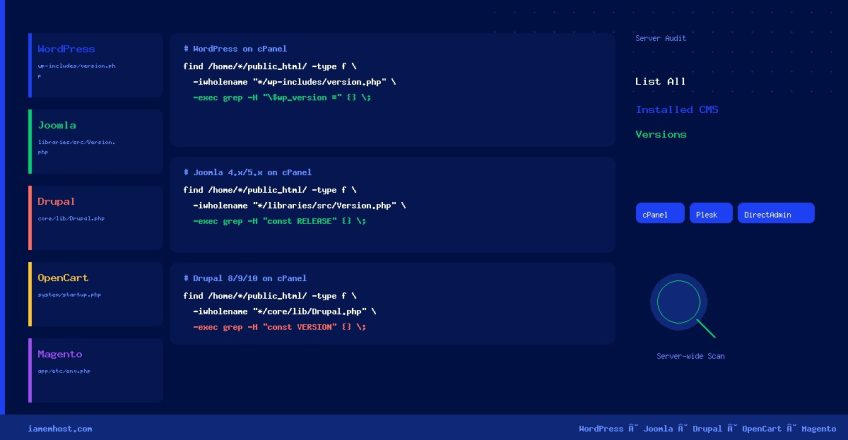

As a hosting administrator managing dozens or hundreds of accounts, knowing exactly which CMS is installed — and which version — across all accounts is essential for security patching, audit compliance, and mass upgrades. This guide provides ready-to-run one-liner commands for cPanel, Plesk, and DirectAdmin servers covering WordPress, Joomla, Drupal, OpenCart, and Magento.
WordPress
WordPress stores its version in wp-includes/version.php. This command finds every installation and prints the full path alongside the version string:
cPanel
find /home/*/public_html/ -type f -iwholename "*/wp-includes/version.php"
  -exec grep -H "$wp_version =" {} ;
Plesk
find /var/www/vhosts/*/httpdocs -type f -iwholename "*/wp-includes/version.php"
  -exec grep -H "$wp_version =" {} ;
DirectAdmin
find /home/*/domains/*/public_html/ -type f -iwholename "*/wp-includes/version.php"
  -exec grep -H "$wp_version =" {} ;
Joomla
Joomla’s version file location and variable names changed across major versions. Use separate commands for legacy (1.x–3.x) and modern (4.x–5.x) installations:
Joomla 3.x and Earlier — cPanel
find /home/*/public_html/ -type f
  ( -iwholename '*/libraries/joomla/version.php'
     -o -iwholename '*/libraries/cms/version.php'
     -o -iwholename '*/libraries/cms/version/version.php' )
  -print0 | xargs -0 grep -lH "RELEASE" 2>/dev/null | while read f; do
    grep -E "RELEASE|DEV_LEVEL" "$f" | awk -F"'" '{print FILENAME": "$2}' FILENAME="$f"
  done
Joomla 4.x / 5.x — cPanel
find /home/*/public_html/ -type f -iwholename '*/libraries/src/Version.php'
  -exec grep -H "const RELEASE|const DEV_LEVEL|const PATCH" {} ;
Joomla — Plesk
# Joomla 3.x and earlier
find /var/www/vhosts/*/httpdocs -type f
  ( -iwholename '*/libraries/joomla/version.php'
     -o -iwholename '*/libraries/cms/version/version.php' )
  -exec grep -H "RELEASE|DEV_LEVEL" {} ;

# Joomla 4.x / 5.x
find /var/www/vhosts/*/httpdocs -type f -iwholename '*/libraries/src/Version.php'
  -exec grep -H "const RELEASE|const PATCH" {} ;
Drupal
Drupal 7 stores its version in an .info file inside the system module. Drupal 8, 9, and 10 store the version as a PHP constant in core/lib/Drupal.php:
Drupal 7 — cPanel
find /home/*/public_html/ -type f -iwholename "*/modules/system/system.info"
  -exec grep -H "^version" {} ;
Drupal 8 / 9 / 10 — cPanel
find /home/*/public_html/ -type f -iwholename "*/core/lib/Drupal.php"
  -exec grep -H "const VERSION" {} ;
Drupal — Plesk
# Drupal 7
find /var/www/vhosts/*/httpdocs -type f -iwholename "*/modules/system/system.info"
  -exec grep -H "^version" {} ;

# Drupal 8 / 9 / 10
find /var/www/vhosts/*/httpdocs -type f -iwholename "*/core/lib/Drupal.php"
  -exec grep -H "const VERSION" {} ;
OpenCart
cPanel
find /home/*/public_html/ -type f -iwholename "*/system/startup.php"
  -exec grep -H "VERSION" {} ;
Plesk
find /var/www/vhosts/*/httpdocs -type f -iwholename "*/system/startup.php"
  -exec grep -H "VERSION" {} ;
Magento
Magento 1.x — cPanel
find /home/*/public_html/ -type f -iwholename "*/app/Mage.php"
  -exec grep -H "getVersionInfo|'major'|'minor'|'revision'" {} ;
Magento 2.x — cPanel
find /home/*/public_html/ -type f -iwholename "*/app/etc/env.php"
  -exec grep -lH "Magento" {} ; | while read f; do
    dir=$(dirname $(dirname "$f"))
    grep -r ""version"" "$dir/composer.json" 2>/dev/null | head -1 | awk '{print "'"$f"':", $2}'
  done
Bonus: Count Installs per CMS
To get a quick summary count of each CMS across all accounts (useful for audit reports), pipe the find output through wc -l:
# Count all WordPress installs on cPanel
find /home/*/public_html/ -type f -iwholename "*/wp-includes/version.php" | wc -l

# Count all Joomla 4/5 installs on cPanel
find /home/*/public_html/ -type f -iwholename "*/libraries/src/Version.php" | wc -l

# Count all Drupal 8/9/10 installs on cPanel
find /home/*/public_html/ -type f -iwholename "*/core/lib/Drupal.php" | wc -l
CMS Version File Reference
| CMS | Version | Version File Path | Key String to grep |
|---|---|---|---|
| WordPress | All | wp-includes/version.php | $wp_version = |
| Joomla | 1.x – 3.x | libraries/joomla/version.php | RELEASE |
| Joomla | 4.x – 5.x | libraries/src/Version.php | const RELEASE |
| Drupal | 7 | modules/system/system.info | version = |
| Drupal | 8 / 9 / 10 | core/lib/Drupal.php | const VERSION |
| OpenCart | All | system/startup.php | VERSION |
| Magento | 1.x | app/Mage.php | getVersionInfo |
| Magento | 2.x | app/etc/env.php + composer.json | version |
Performance Tip for Large Servers
On servers with thousands of accounts, these find commands can take several minutes. Run them in a screen or tmux session and redirect output to a file for later review:
screen -S cms-audit
find /home/*/public_html/ -type f -iwholename "*/wp-includes/version.php"
  -exec grep -H "$wp_version =" {} ; > /root/wp-audit-$(date +%Y%m%d).txt 2>/dev/null
# Detach: Ctrl+A then D