
The legacy mongo PHP extension was the original driver for connecting PHP to MongoDB. It was officially deprecated in 2015 and removed from active PECL support after PHP 5.6. If you are running PHP 7.0 or later, the mongo extension will not compile — you must use the modern mongodb extension instead.
This guide is provided for administrators who must maintain legacy PHP 5.x applications that cannot yet be migrated. If you have any choice in the matter, skip to the migration section below.
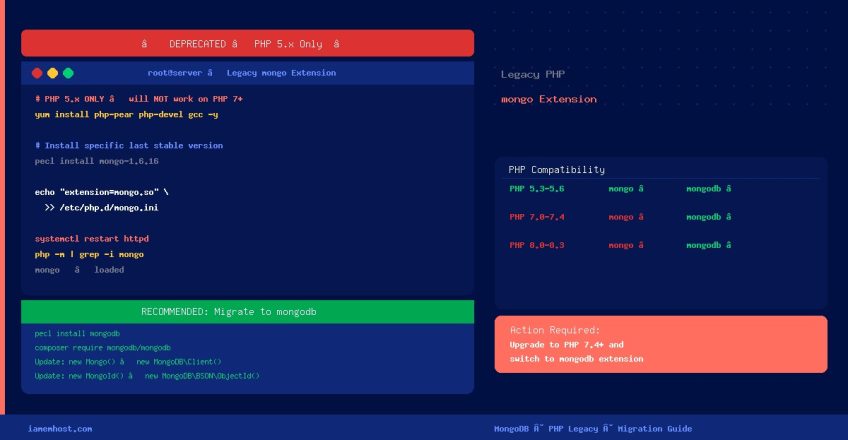
Legacy mongo Extension: Compatibility Table
| PHP Version | mongo extension | mongodb extension | Recommendation |
|---|---|---|---|
| PHP 5.3 – 5.6 | ✅ Supported (last release: 1.6.16) | ✅ Supported | Migrate to mongodb now |
| PHP 7.0 – 7.4 | ❌ Not supported (fails to compile) | ✅ Supported | Use mongodb extension |
| PHP 8.0 – 8.3 | ❌ Not supported | ✅ Supported | Use mongodb extension |
Installing the Legacy mongo Extension (PHP 5.x Only)
Step 1 — Install Prerequisites
# CentOS 6 / CentOS 7 with PHP 5.x
yum install php-pear php-devel openssl-devel gcc make -y
Step 2 — Install the mongo Extension via PECL
# Install the last known-good version of the legacy mongo driver
pecl install mongo-1.6.16
Specifying version 1.6.16 is important — it is the final stable release and the only one that cleanly compiles against PHP 5.x. Running pecl install mongo without a version may attempt a newer, incompatible release.
Step 3 — Enable the Extension
# Add to php.ini
echo "extension=mongo.so" >> /etc/php.ini

# Or create a dedicated drop-in config (cleaner approach)
echo "extension=mongo.so" > /etc/php.d/mongo.ini
Step 4 — Restart Apache
# CentOS 6 (SysV init)
service httpd restart

# CentOS 7+ (systemd)
systemctl restart httpd
Step 5 — Verify
php -m | grep -i mongo

# Expected output:
# mongo
Migrating from mongo to mongodb (Strongly Recommended)
The legacy mongo extension uses a completely different API from the modern mongodb extension. You cannot simply swap the extension and expect your code to work — the classes and method names have changed. Here is what changes:
| Legacy (mongo) | Modern (mongodb + library) |
|---|---|
new Mongo() | new MongoDBClient() |
new MongoClient() | new MongoDBClient() |
$db->collection->find() | $db->collection->find() (similar) |
new MongoId($id) | new MongoDBBSONObjectId($id) |
new MongoDate() | new MongoDBBSONUTCDateTime() |
MongoCursor | MongoDBDriverCursor |
Migration Steps
- Upgrade your server to PHP 7.4 or 8.x
- Install the modern
mongodbPECL extension (pecl install mongodb) - Install the MongoDB PHP Library:
composer require mongodb/mongodb - Update your application code to use the new
MongoDBClientAPI - Replace all legacy classes (
MongoId,MongoDate, etc.) with theirMongoDBBSON*equivalents - Run your test suite and fix any remaining compatibility issues
MongoDB provides an official upgrade guide in the PHP documentation covering the full API differences.