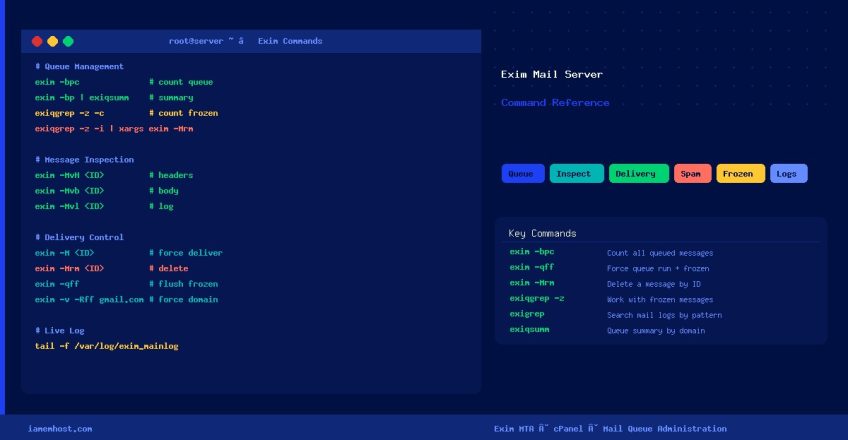

Exim is the default Mail Transfer Agent (MTA) on cPanel servers and many other Linux hosting environments. This reference guide covers the most important Exim commands for daily mail server administration — from inspecting the queue and forcing delivery to tracking down spam sources and clearing frozen messages.
Queue Management
Count Messages in Queue
# Total message count (fast)
exim -bpc

# Detailed queue listing (message ID, size, age, sender, recipient)
exim -bp

# Paginate through large queues
exim -bp | less

# Queue summary grouped by destination domain
exim -bp | exiqsumm
Force a Queue Run
# Trigger a queue run (attempt re-delivery of all queued messages)
exim -qf

# Queue run AND attempt to deliver frozen messages
exim -qff

# Force delivery to a specific domain
exim -v -Rff gmail.com
Top Senders in Queue
# List top senders sorted by message count (highest first)
exim -bp | grep "<" | awk '{print $4}' | sort | uniq -c | sort -rn | head -20
Message Inspection
View Message Details
# View the headers of a specific message
exim -MvH

# View the body of a specific message
exim -Mvb

# View the delivery log for a specific message
exim -Mvl

# View all parts of a message (headers + body + log)
exim -Mvc
Check Subjects of Queued Messages
exiqgrep -i | awk '{ print "exim -Mvh "$1 }' | sh | grep -i SubjectTrace Delivery Path for an Address
exim -d -bt user@domain.comDelivery Control
# Force immediate delivery of a single message
exim -M

# Remove (delete) a single message from the queue
exim -Mrm

# Unfreeze a frozen message (mark for retry)
exim -Mf

# Give up on a frozen message and generate a bounce
exim -Mg
Frozen Messages
Count and List Frozen Messages
# Count frozen messages
exiqgrep -z -c

# List frozen message IDs
exiqgrep -z -i

# Show frozen messages from the queue listing
exim -bp | awk '/frozen/ {print}'
Delete All Frozen Messages
# Method 1: using exiqgrep (recommended)
exiqgrep -z -i | xargs exim -Mrm

# Method 2: using grep on msglog
grep -rl '*** Frozen' /var/spool/exim/msglog/ | xargs -I{} basename {} | xargs exim -Mrm
Spam Management
Delete All Spam-Tagged Messages
# Remove messages marked [SPAM] in the log
grep -rl '[SPAM]' /var/spool/exim/msglog/ | xargs -I{} basename {} | xargs exim -Mrm
Delete All Messages from a Specific Sender
# Method 1: search spool input files
grep -lr 'spammer@domain.com' /var/spool/exim/input/ |
  sed 's/^.*/([a-zA-Z0-9-]*)-[DH]$/1/' | xargs exim -Mrm

# Method 2: filter queue listing
exim -bp | grep "spammer@domain.com" | awk '{print $3}' | xargs exim -Mrm
Finding Spam Sources
Identify Scripts Sending Spam via Working Directory
Exim logs the cwd= (current working directory) of processes that inject mail. Use this to trace which PHP script or directory is originating the spam:
# Find top working directories in the Exim main log (cPanel path)
grep "cwd=" /var/log/exim_mainlog | awk '{for(i=1;i<=NF;i++) if($i~/^cwd=/) print $i}'
  | sort | uniq -c | sort -rn | head -20

# Alternative log path (non-cPanel servers)
grep "cwd=" /var/log/exim/main.log | awk '{for(i=1;i<=NF;i++) if($i~/^cwd=/) print $i}'
  | sort | uniq -c | sort -rn | head -20
Find the Exact Spamming Process
# List all running PHP processes with their full environment/args
# Replace 'username' with the cPanel account username identified above
ps auxwwwe | grep php | grep username | grep -v grep

# Or search by the specific script path found in cwd= logs
ps auxwwwe | grep "/home/username/public_html" | grep -v grep | head -20
Use exigrep to Search Mail Logs
# Search Exim mainlog for a specific address (shows full delivery chain)
exigrep user@domain.com /var/log/exim_mainlog

# Search for messages from a sending IP
exigrep '203.0.113.10' /var/log/exim_mainlog | tail -50
Log Monitoring
# Live tail of Exim main log (cPanel)
tail -f /var/log/exim_mainlog

# Live tail (non-cPanel)
tail -f /var/log/exim/main.log

# Reject log (cPanel)
tail -f /var/log/exim_rejectlog

# Panic log — check this if Exim is misbehaving
tail -f /var/log/exim_paniclog
Quick Reference Table
| Task | Command |
|---|---|
| Count queue | exim -bpc |
| List queue | exim -bp |
| Queue summary by domain | exim -bp | exiqsumm |
| View message headers | exim -MvH <ID> |
| View message body | exim -Mvb <ID> |
| View message log | exim -Mvl <ID> |
| Force deliver one message | exim -M <ID> |
| Delete one message | exim -Mrm <ID> |
| Unfreeze a message | exim -Mf <ID> |
| Force queue run | exim -qf |
| Force queue run (incl. frozen) | exim -qff |
| Count frozen messages | exiqgrep -z -c |
| Delete all frozen | exiqgrep -z -i | xargs exim -Mrm |
| Force delivery to domain | exim -v -Rff domain.com |
| Trace delivery path | exim -d -bt user@domain.com |
| Search mail log | exigrep pattern /var/log/exim_mainlog |
| Live log tail | tail -f /var/log/exim_mainlog |