
Choosing between shared hosting, a VPS, and cloud hosting is one of the first big decisions for any website owner — and the wrong choice means either overpaying for resources you don’t need or hitting performance limits that cost you visitors. This guide breaks down exactly how the three differ in performance, cost, scalability, and control, so you can confidently pick the right one for your situation.
The Apartment Analogy
- Shared Hosting = renting a room in a shared house. Cheap, but you share the kitchen, bathroom, and utilities with everyone else. If a housemate throws a party, your experience suffers.
- VPS = renting your own apartment in a building. You have private, guaranteed space and resources, your own locked door, and freedom to renovate inside — but you share the building’s foundation.
- Cloud Hosting = a smart apartment that automatically expands rooms when you have guests and shrinks when they leave. You pay for what you use, and if one building has a problem, you instantly move to another.
Shared Hosting
Multiple websites live on a single server and share its CPU, RAM, and storage. It’s the most affordable option and requires no technical knowledge — a control panel like cPanel handles everything.
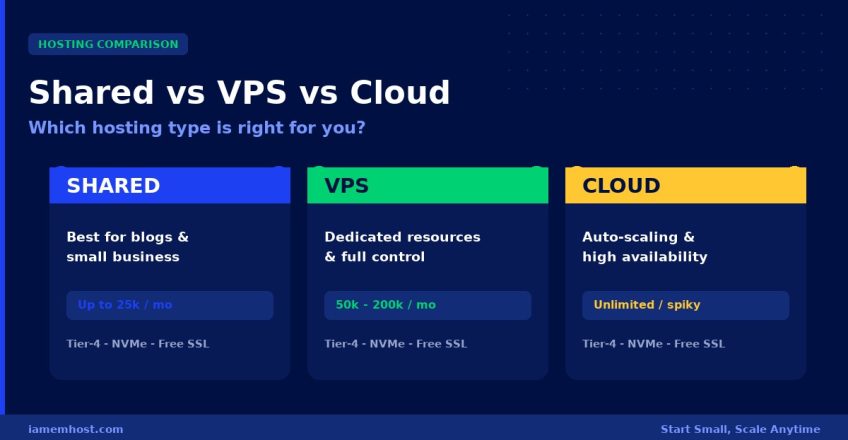
Best for: Personal blogs, small business sites, portfolios, and new websites with up to ~25,000 monthly visitors.
- ✅ Cheapest option — starts from a few hundred rupees per month
- ✅ Zero server management — fully managed with cPanel
- ✅ Free SSL, email, and one-click WordPress install included
- ❌ Resources shared with neighbours — a busy site can slow yours
- ❌ No root access — can’t install custom server software
VPS (Virtual Private Server)
A physical server is divided into isolated virtual machines, each with guaranteed, dedicated CPU, RAM, and storage. Your resources are yours alone — no noisy neighbours. You also get root access to install anything you need.
Best for: Growing businesses, e-commerce stores, high-traffic WordPress sites, web apps, and anyone needing custom server configuration. Comfortably handles 50,000–200,000+ monthly visitors.
- ✅ Guaranteed dedicated resources — consistent performance
- ✅ Full root access for custom software and configuration
- ✅ Isolated and more secure than shared hosting
- ✅ Available fully managed, so you don’t need to be a sysadmin
- ❌ Costs more than shared hosting
- ❌ Unmanaged VPS requires Linux administration skills
Cloud Hosting
Your site runs across a cluster of connected servers rather than a single machine. Resources scale up or down automatically based on demand, and if one server fails, another instantly takes over — delivering the highest reliability of the three.
Best for: High-traffic sites, applications with unpredictable or seasonal traffic spikes, SaaS products, and businesses where downtime directly costs revenue.
- ✅ Auto-scaling — handles traffic spikes without crashing
- ✅ Highest uptime — no single point of failure
- ✅ Pay only for the resources you actually use
- ✅ Provision more capacity in minutes, not days
- ❌ Variable monthly cost can be harder to predict
- ❌ More complex — managed cloud services are recommended
Side-by-Side Comparison
| Factor | Shared | VPS | Cloud |
|---|---|---|---|
| Cost | Lowest | Moderate | Variable (pay-as-you-go) |
| Performance | Good (shared) | High (dedicated) | Highest (scalable) |
| Resources | Shared | Guaranteed | Elastic / on-demand |
| Scalability | Limited | Manual upgrade | Automatic |
| Root access | No | Yes | Yes |
| Uptime | Good | Very good | Excellent (failover) |
| Management | Fully managed | Managed or self | Managed recommended |
| Ideal traffic | Up to ~25k/mo | 50k–200k+/mo | Unlimited / spiky |
How to Decide in 30 Seconds
- Just starting out, blog, or small business site? → Shared Hosting. It’s affordable, fully managed, and you can upgrade later with zero hassle.
- Growing traffic, an online store, or need custom software? → Managed VPS. Dedicated resources and full control, without needing to be a server admin.
- High or unpredictable traffic, or downtime costs you money? → Managed Cloud (AWS). Auto-scaling and failover for maximum reliability.
The Smart Path: Start Small, Scale When Ready
You don’t have to get it perfect on day one. The best strategy is to start with the plan that fits your current traffic and upgrade as you grow. At IAMEM HOSTING, you can move from shared hosting to VPS to managed cloud without downtime or data loss — our team handles the entire migration for you. Whichever tier you choose, you get the same Tier-4 data centre infrastructure, NVMe storage, free SSL, and 24×7 India-based support.