
Two VPS plans can advertise the same “4 vCPU, 8 GB RAM, 100 GB NVMe” and behave completely differently in production. The reason is the virtualization technology underneath: KVM, OpenVZ, LXC or Docker. One gives you a real, isolated machine; another gives you a slice of someone else’s kernel that can be oversold. This guide explains the difference in practical terms and shows you how to check what your own server is running.
Two Families: Hypervisors and Containers
Every option falls into one of two camps:
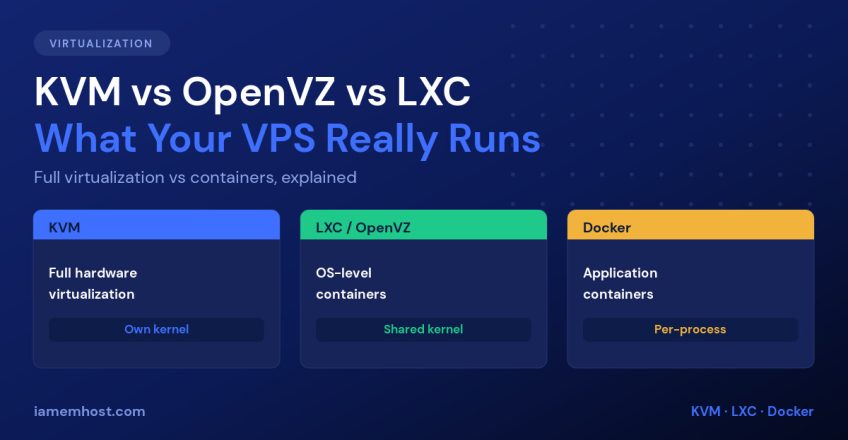
- Hardware virtualization (hypervisors) — the host emulates a whole computer. Each guest boots its own kernel and believes it owns real hardware. KVM, VMware ESXi and Hyper-V work this way.
- OS-level virtualization (containers) — all guests share the host’s kernel, isolated by namespaces and cgroups. OpenVZ, LXC and Docker work this way.
That one distinction — own kernel versus shared kernel — explains nearly every practical difference that follows.
KVM: A Real Virtual Machine
KVM (Kernel-based Virtual Machine) turns the Linux kernel into a type-1 hypervisor using CPU virtualization extensions (Intel VT-x / AMD-V). Each guest gets virtual hardware, its own kernel and its own memory that the host cannot hand to anyone else.
What that buys you in practice:
- RAM is genuinely yours. Providers can overcommit CPU, but allocated memory is far harder to oversell than on container platforms.
- You can load kernel modules — WireGuard, custom iptables targets, ZFS, TUN/TAP for VPNs, FUSE mounts.
- You can run any OS, including Windows, BSD, or a custom kernel.
- You can run Docker inside it without provider restrictions.
- Real swap works normally.
The cost is a few percent of performance overhead and slightly slower boots — irrelevant for almost every hosting workload.
OpenVZ and LXC: Containers Sold as VPS
OpenVZ (now largely superseded by Virtuozzo) and LXC both create full system containers: they look like a Linux server, run systemd, have their own users, packages and IP — but they share the host kernel.
Because there is no hypervisor layer, they are extremely efficient. A host can pack far more containers onto the same hardware, which is why OpenVZ VPS plans are consistently the cheapest on the market. The trade-offs are real:
- You cannot change the kernel or load modules. No custom kernel, and VPN software may be blocked unless the host enables TUN/TAP.
- Memory is commonly overcommitted. Your “8 GB” may be a ceiling shared with neighbours rather than a reservation.
- Noisy neighbours hit harder because you share a kernel and its I/O scheduler.
- Linux only, and only distributions compatible with the host kernel.
LXC in a platform like Proxmox VE, where you control the host, avoids most of these objections — the problem is not the technology, it’s buying a container while believing you bought a machine.
Docker: Application Containers, Not Servers
Docker is a different category despite using the same kernel features. An LXC container is a lightweight machine; a Docker container is a single application process with its dependencies, designed to be immutable, disposable and started in milliseconds.
You don’t SSH into it, patch it and keep it for two years — you rebuild the image and redeploy. Docker is what you run on a VPS to package your application, not what you buy as a VPS.
Side-by-Side Comparison
| KVM | LXC / OpenVZ | Docker | |
|---|---|---|---|
| Own kernel | Yes | No | No |
| RAM guaranteed | Yes | Often overcommitted | Host-dependent |
| Load kernel modules | Yes | No | No |
| Run Windows/BSD | Yes | No | No |
| Run Docker inside | Yes | Sometimes restricted | N/A |
| Boot time | Seconds | Under a second | Milliseconds |
| Density per host | Lower | High | Very high |
| Typical price | Higher | Cheapest | N/A |
| Best for | Production sites, VPNs, control panels | Budget workloads, internal services | App deployment and CI/CD |
How to Tell What Your VPS Is Actually Running
Don’t take the sales page at its word — ask the server:
# The quickest answer: prints kvm, lxc, openvz, docker, or none
systemd-detect-virt

# More detail
virt-what          # install: dnf install virt-what / apt install virt-what

# KVM guests show a virtualised CPU and hypervisor flag
lscpu | grep -i -E "hypervisor|model name"
dmesg | grep -i -E "kvm|hypervisor" | head

# OpenVZ containers expose this file; KVM guests do not
cat /proc/user_beancounters 2>/dev/null && echo "OpenVZ container"

# Containers cannot see real kernel modules
lsmod | wc -l      # a handful or an error suggests a container
Two more quick tells: on a container, free -m often reports the host’s total memory rather than your allocation, and uname -r shows a kernel version you never installed and cannot change.
Which Should You Choose?
- Hosting a production website, store or client sites? KVM. Guaranteed RAM and full kernel control are worth the price difference, and control panels like cPanel and Plesk expect it.
- Running a VPN, firewall, or anything needing kernel modules? KVM — containers simply can’t.
- Need cheap capacity for a staging box, monitoring agent or IRC bouncer? LXC or OpenVZ is fine and costs a fraction as much.
- Deploying applications repeatably? Docker, running on top of a KVM VPS.
- Building your own virtualization host? Proxmox VE gives you KVM and LXC side by side on one machine.
Conclusion
The label on a VPS plan matters less than the kernel underneath it. KVM gives you a real virtual machine with your own kernel and reserved memory; OpenVZ and LXC give you an efficient, cheaper container that shares the host’s kernel and can be oversold; Docker packages applications rather than servers. Run systemd-detect-virt on any VPS you’re evaluating — and for anything running a real website, choose KVM.